Free Temperature Log SheetChoose the kind of sheet, set your columns, check the preview, then print or save it as a PDF. No sign-up, and nothing you type is uploaded.
Layout
Whole page · the printed page has no watermark or logo.
Examples2 layouts filled in with made-up details. Open one to start with that layout, or print a blank template to fill in by hand.
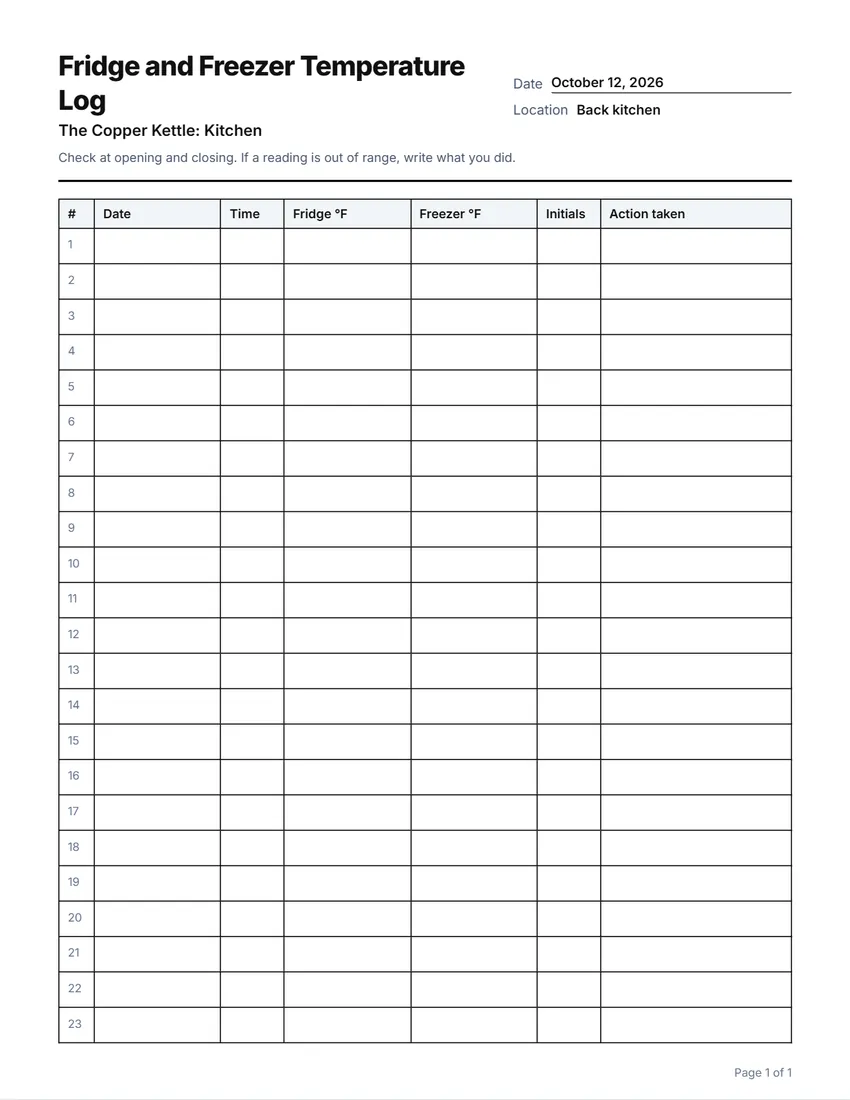 Default layout
GridEvery cell boxed, like a printed sign-in book.
Start with this layoutOpen
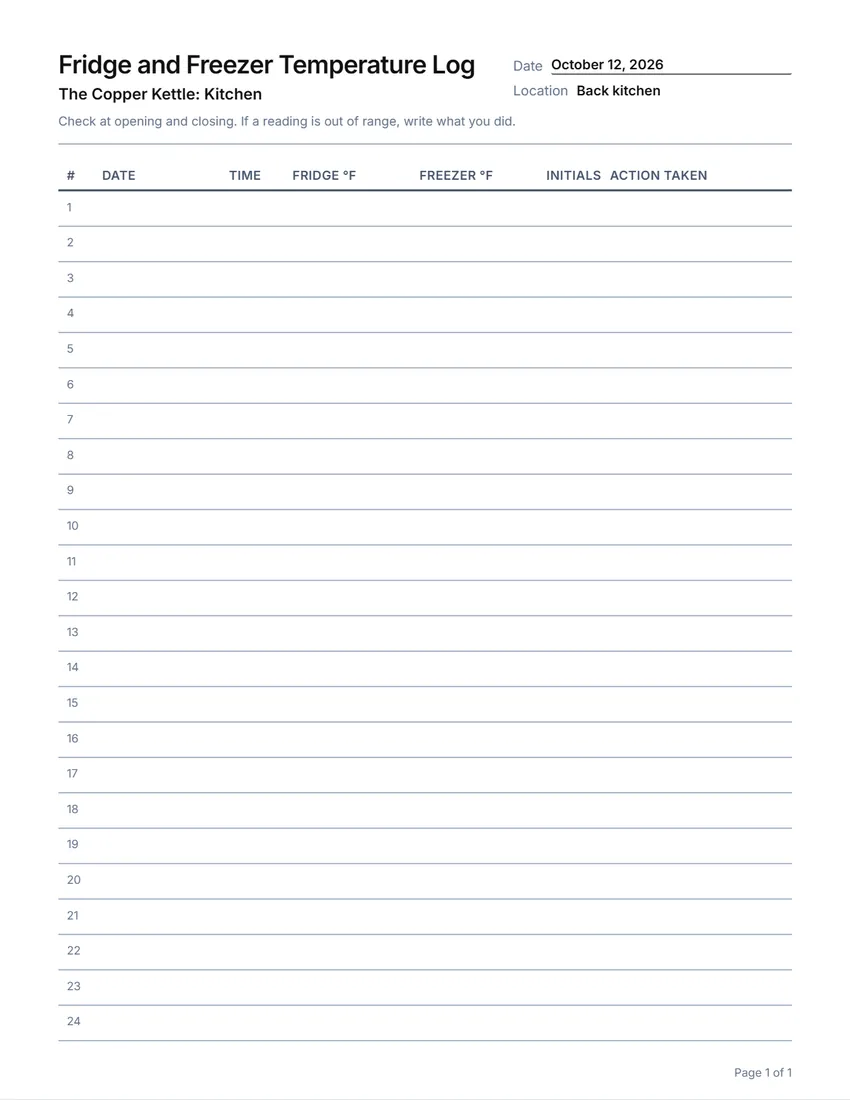 Layout
LinedLines between the rows only. Saves ink.
Start with this layoutOpen
Prefer to fill it in by hand? Print a blank template and write on it.
Related tools
Goes well with this one
Was this tool useful?
Notice: Generated via SnapPaperwork. For your own kitchen or store. Write readings when you take them; filling a log in later, or with readings nobody took, defeats its purpose and can break health rules.
Something missing? Tell me what you need.
How to make a temperature log in 3 steps
-
Choose the kind of log
Fridge and freezer, several units twice a day, cooking, cooling, hot holding, deliveries, or room temperature and humidity. Each starts with the usual columns, which you can rename, widen, move, remove or add to.
-
Add your units and a note
List the fridges and freezers to print them in the first column, and write the rule your staff should follow, such as when to check and what to do when a reading is off.
-
Print and post it
Print a month of pages and keep them on a clipboard by the fridge or the line, with a pen and a thermometer.
Which temperature log do you need?
- Fridge and freezer: date, time, the fridge and freezer readings, initials and what was done about a reading out of range.
- Several units, twice a day: each fridge or freezer on its own row, with morning and evening readings.
- Cooking: the food, the temperature it reached and when.
- Cooling: the food’s temperature when cooling starts and at two later checks.
- Hot holding: food kept hot on a line or buffet, checked twice.
- Deliveries received: supplier, item, temperature on arrival and whether it was accepted.
- Room temperature and humidity: for stock rooms, pharmacies, server rooms or storage.
Safe temperatures
For food at home, the US Food and Drug Administration says: “Keep the refrigerator temperature at or below 40° F (4° C)” and “The freezer temperature should be 0° F (-18° C).”
Restaurants, cafes and other food businesses follow the food code their state or local health department uses, which sets the temperatures for cold holding, cooking, cooling and hot holding and how long to keep logs. Ask your health department or inspector; this page does not set them.
Use a thermometer you trust and check it now and then; the dial on a fridge is not a reading.
Tips for a temperature log that works
- Change “°F” to “°C” in the column names if you measure in Celsius.
- Write the safe range in the note at the top, so everyone knows what “out of range” means.
- Fill in “Action taken” every time a reading is off: moved the food, called for repair, threw it out.
- Check at the same times every day, such as at opening and closing.
- Keep finished pages in a folder by month, for your own records and for inspections.
Checked in October 2026. This page is general information, not legal advice.
Frequently asked questions
Is this temperature log maker free?
Yes. It is free to use, needs no account or sign-up, and never adds a watermark or a SnapPaperwork logo to your log.
What temperature should a fridge be?
For food at home, the FDA says to keep the refrigerator at or below 40°F (4°C) and the freezer at 0°F (-18°C). Food businesses should follow the food code their health department uses.
Can I log several fridges on one sheet?
Yes. Choose “Several units, twice a day” and list your fridges and freezers under “Units to print”: each gets its own row with morning and evening readings.
Can I use Celsius?
Yes. Rename the columns, for example “Fridge °C”, on the sheet or in the form.
Can I change the columns?
Yes. Rename, widen, move or remove any column, or add your own, up to eight.
Is my information uploaded or stored on your servers?
No. Everything you type stays in your browser and is never sent to me. It is saved on your own device so it is there next time.